BoltAI 2.17.2
Build 90
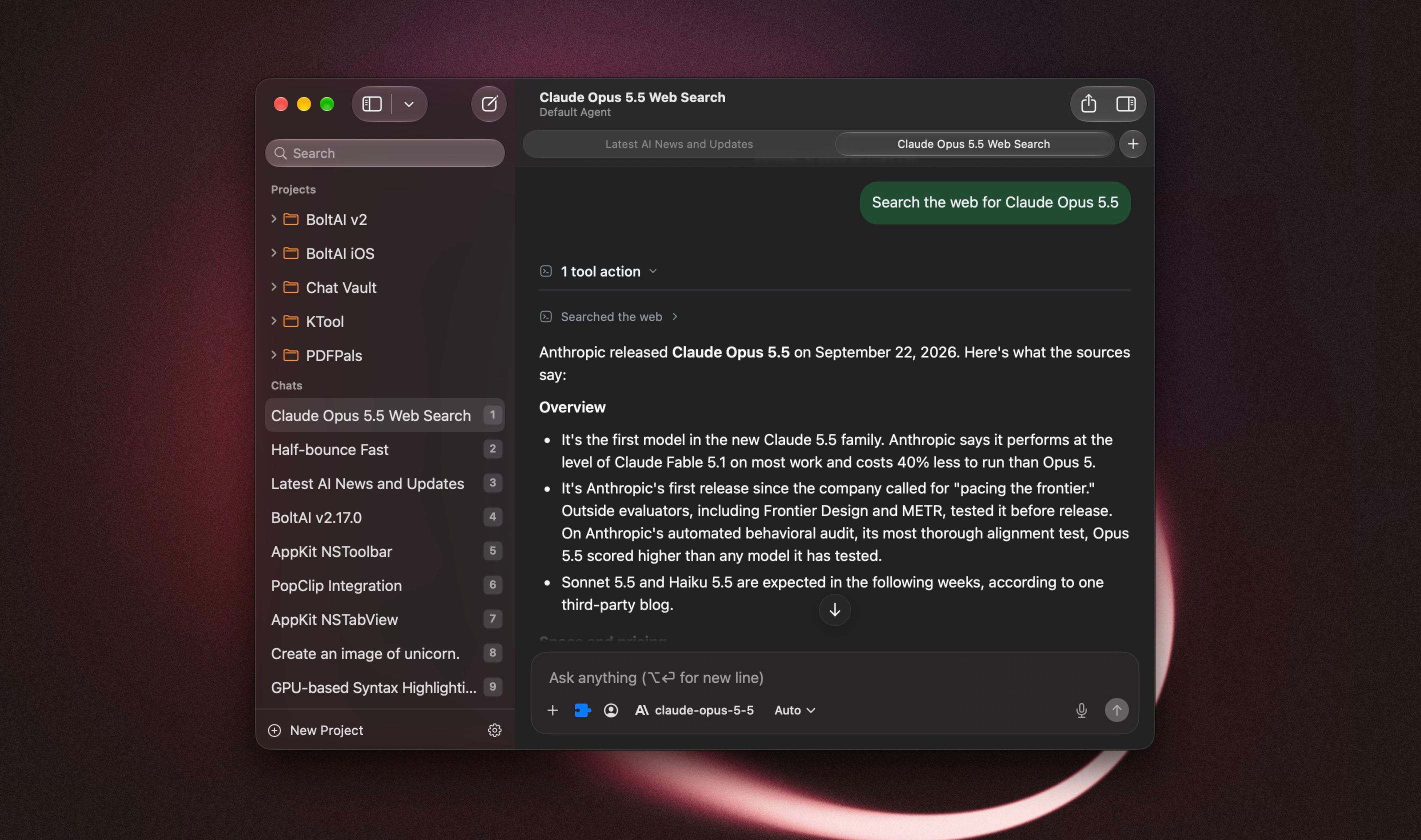
BoltAI now feels more at home on your Mac. The rebuilt chat window brings a native toolbar and sidebar, scrolling that blends into the window, and faster chat switching. This update covers 2.17.0 through 2.17.2, including a fix for a launch crash on macOS 13 and 14.
On macOS 13 or 14 and BoltAI quits right after opening? Download 2.17.2 and install it manually. Here's how.
New
- A more native chat window: the toolbar, sidebar search, and window layout fit macOS more closely. On macOS 26, chat content scrolls beneath the toolbar and the inspector blends with its header.
- Customize the toolbar with the actions you use most, including Share and one-click PDF export.
- Experimental chat tabs: press Command-T for a new tab, or right-click a chat and choose Open in New Tab. Each tab keeps its own place, and you can reopen closed tabs. To try them, go to Settings > Developer > Feature Flags, turn on "Enable native chat tabs (experimental)", then restart BoltAI.
- Review and remove duplicate starter prompts, agents, and workflows from your library. BoltAI shows what will be removed before you confirm.
Improved
- The reasoning menu next to the model picker now offers Extra High and Max for supported Claude models.
- Kimi K3 can now use Low and High reasoning, not only Max, to keep costs down.
- Supported Claude models have a larger default response allowance, giving them more room to think and finish an answer. Your custom limits still apply.
- Long sessions use less memory, especially with document attachments.
- AI Workflows explain capture and permission problems more clearly, help you turn on Accessibility, and let you review an incomplete result.
- Unavailable MCP tools stay visible in chat, agent, and project settings, so you can remove them. Deleting an MCP server also removes its tool selections, including on your other devices.
- Model pickers keep cached models visible while an updated list loads.
- BoltAI no longer offers to install starter prompts, agents, or workflows you already have.
Fixed
- Fixed BoltAI crashing at launch on macOS 13 and 14.
- Fixed the About window opening by itself at launch on macOS 13 and 14.
- Fixed "Hide Dock icon when last window closes" not working reliably on macOS 13 and 14.
- Project folders in the sidebar show their orange color again on macOS 14 and 15.
- Fixed a crash when stopping a response while it streams, a rare crash in background sync, and a crash when stopping speech playback.
- Fixed AI Workflows that insert or copy their result directly failing with "The model returned an empty response" when using Codex CLI. [ref]
- Fixed chats failing to send when an MCP server could not load. AI Workflows also continue when a selected MCP tool is unavailable.
- Fixed results or errors from an earlier AI Workflow appearing in a later run, and No Preview workflows not completing when run back to back.
- Fixed certain AI Workflow requests failing with custom API base URLs.
- Saved custom OpenRouter endpoints are now used when loading models and sending requests.
- Custom agents keep their selected plugins, and interrupted settings saves no longer show a cancellation error. [ref]
- Claude now reports when its response allowance runs out before it answers. [ref]
- Answers that fail to save stay visible when you switch chats, and regenerating one no longer brings back later messages.
- Documents keep their extracted text if the original file is missing, and chats continue when an attached document can't be read.
- Dragged images use the correct format, and attachment-loading failures show an error.
- Prompt editor headings and buttons stay visible in their sheets.
Note: AI Workflows need Accessibility permission. If your workflows don't run, turn on BoltAI in System Settings > Privacy & Security > Accessibility, then try again.