Hello,
Brand new user here - I’ve never had BoltAI (any version) installed or used before. I’ve been investigating AI apps and came across yours. I’m no stranger to betas and thought it looked quite far along so I jumped in downloading 2.0.5 from the Changelog page.
Upon launching, the welcome screen came up, along with an update prompt, and a keychain permission window - BoltAI wants to use your confidential information stored in supabase.gotrue.swift in your keychain. Enter your login keychain password.
After checking and identifying this is likely a package you are using, I tried to authenticate. It accepts my password, but regardless of if I select Always Allow, Deny or Allow, it continually comes up.
I attempted to update to 2.0.9 via the update prompt that appeared in the background, but this version also does the same.
Running Sequoia 15.6.1 on a MacBook Pro 14-inch 2021 M1 Pro.
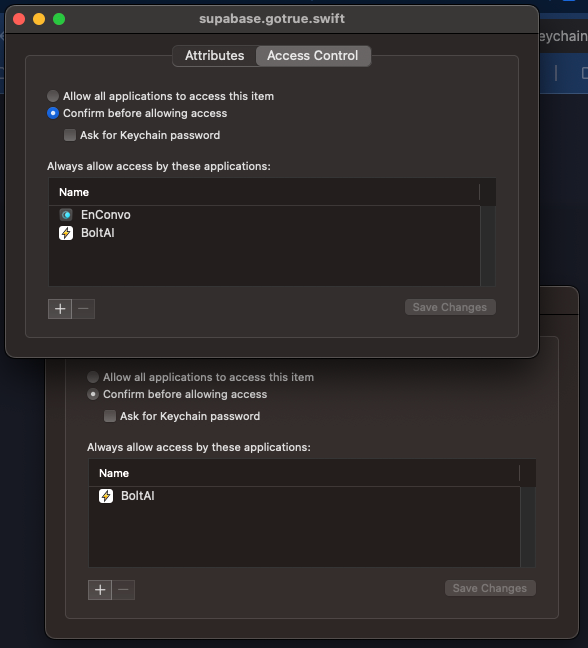
Searching in Keychain Access reveals two items with supabase (see screenshots below). I assume the one dated today is from BoltAI, and the one from yesterday must be from a different piece of software that also uses it.
Inspecting the properties of both confirm this - EnConvo is the other one, which I am also trialling.
And finally, since I don’t have anything in EnConvo that I wouldn’t necessarily want your app to be able to access, I tried adding BoltAI to the EnConvo one, and that successfully resolved the keychain prompts. It doesn’t seem to like two of them being there and is trying to obtain access to the EnConvo one and can’t.
Let me know if you want any more information, or if you want me to test something else. For now I’ll just (start, as I’m still at the welcome screen) continue trialing with your application listed under both.